
Add a checkpointer to an agent graph and a crash no longer loses the run. Graph engineering is the design of an AI agent's control flow as an explicit graph of nodes, edges and state, together with what keeps it alive in production: checkpoints, pauses for a person, and resumption after failure. A checkpointer is easy to read as "crash-safe". It is not. Take a purchasing agent built as a graph: it reads a request for 40 laptops, checks the budget, pauses for a manager to approve, then calls the supplier. Kill the worker after the supplier call returns, before the framework records that the step finished. Then resume. The run carries on from its last checkpoint and places the order again. Eighty laptops are now on their way for 40 new hires, and every box and arrow on the diagram was correct.
This is not a story from a client. The LangGraph code later in this note reproduces it: drop the key, add a crash after the insert, and resume. The stand-in supplier then holds two identical orders for one purchase request.
A graph decides what runs next. It cannot make a step safe to run twice.
Graph engineering is a label that began circulating in July 2026 for building agents on large language models (LLMs) as explicit graphs. It is a useful label, though still emerging rather than a settled standard term, and it is usually sold on the first half of the definition above. This note covers both halves: what the term means, when a graph earns its place, and the durability work that decides whether it survives production.
Our notes use one stack for agent systems: the harness is everything around the model inside one agent run (tools, sandbox, permissions, state and hooks) and hosts the inner agent loop; the graph orchestrates steps and runs; and loop engineering is the outer layer that starts repeated runs, proves "done" and stops them.
If you read only this:
- Use a graph where the business already knows the order of steps. Leave open-ended work to an agent loop inside a single node.
- Checkpoints are taken between steps; side effects happen inside them. A crash in between means the step runs again.
- Give every step that changes the outside world its own node and an idempotency key fixed in state before that node runs.
What graph engineering means
The term is new; the practice is not. LangChain's July 2026 post, 3 Years of Graph Engineering with LangGraph, says the name "surfaced this weekend, kicked off by" a post on X. It calls graph engineering "the latest name for a well established approach to building reliable agents". The point of a graph, in its words, is to "impose your preconceptions of how the system should work into more constrained paths, not relying solely on the judgement of the LLM."
The idea is older than the name. In December 2024 Anthropic's Building effective agents separated workflows, "orchestrated through predefined code paths", from agents, which "dynamically direct their own processes and tool usage". Research in 2024 modelled agents as state machines (StateFlow) and as "computational graphs" (Language Agents as Optimizable Graphs, a paper at the International Conference on Machine Learning, ICML). LangGraph itself, according to its Graph API documentation, runs in discrete super-steps, with message passing "in the style of Google's Pregel system".
The working definition for this note has two halves:
Graph engineering is designing an agent's control flow as an explicit graph of nodes, edges and state, together with what keeps it alive in production: checkpoints, pauses for a person, and resumption after failure.
One scoping decision. Knowledge graphs and GraphRAG are a different graph. The GraphRAG paper (Edge et al., 2024) builds "an entity knowledge graph from the source documents" to answer questions about a whole corpus. There the graph is data the model reads. In graph engineering the graph is the program that runs the model. A system can use both, and retrieval belongs with context engineering. This note is about the control-flow graph.
The four parts: state, nodes, edges, checkpoints

- State is the record of the run. In LangGraph it is a typed schema, usually a
TypedDict, with reducers that decide how updates merge. In Google's Agent Development Kit (ADK) each node's output becomes the next node's input, with session state for anything shared. - Nodes do the work. In LangChain's words, a node "can be deterministic code, a single LLM call, a tool call, or a full agent with its own internal loop."
- Edges decide what runs next. Some are fixed; others are conditional on a node's result or the state. Agent graphs usually have cycles for retries and revisions. They are rarely the directed acyclic graphs (DAGs) of data pipelines.
- Checkpoints save the state at step boundaries. They let a run pause for days, or survive a crash and carry on. A whiteboard diagram never shows them, and production failures live here.
A worked graph in Google ADK 2.0
Google's Agent Development Kit makes a good first example, because it moved to graphs this year. Google's Welcome to ADK 2.0 page gives the dates: ADK Python 2.0 reached general availability on 19 May 2026, Go on 30 June and TypeScript on 21 August. The release moves ADK "from a hierarchical agent executor to a graph-based execution engine", in which agents, tools and functions all run as nodes. For Python and Go, the ADK workflow agents page documents the older Sequential, Parallel and Loop workflow agents as superseded by graph and dynamic workflows.
Here is the purchasing graph from the figure. Every node is a plain function, so it runs without a model or an API key; in production the classifier would be an Agent node.
# google-adk 2.13.0 (Python). Function nodes only, so it runs without a model.
from google.adk import Event, Workflow
from google.adk.events import RequestInput

def classify(node_input):      # in production, an Agent node; current example model: gemini-3.8-flash
    return Event(route="ORDER")

def answer(node_input):
    return Event(output="answered")

def check_budget(node_input):  # plain code: catalogue price and budget lookup
    return {"po": "PO-2291", "item": "laptop", "qty": 40}

def approve(node_input):       # pauses the run until a person replies
    yield RequestInput(message=f"Approve {node_input}?")

def place_order(node_input):   # the side effect, in a node of its own
    return Event(output="ordered" if node_input == "yes" else "rejected")

root_agent = Workflow(name="purchase_flow", edges=[
    ("START", classify),
    (classify, {"ORDER": check_budget, "QUESTION": answer}),
    (check_budget, approve, place_order),
])
Three things to notice. The route is a value, Event(route="ORDER"), and the dictionary edge maps each value to a node, so the model only ever produces a label. The approval node yields RequestInput, and, as ADK's human input guide describes, the run stops there. The side effect sits alone in place_order.
Run against a SQLite-backed session store, the first process stops at the approval. A second process, started fresh with the manager's reply, resumes the same session and runs place_order once; check_budget does not run again. In ADK 2.13.0 a function node's rerun_on_resume setting defaults to false, so the approval node does not re-execute: it completes with the reply as its output. How a client delivers the reply depends on the interface you run the agent behind, so test the full round trip in yours.
To run graphs like this as a managed service on Google Cloud, Agent Runtime in Gemini Enterprise Agent Platform (which Google's Agent Platform overview describes as an evolution of Vertex AI) lists ADK and LangGraph among its supported frameworks. ADK's own graph workflows page notes that graph workflows are not compatible with some integrations, so confirm the combination you plan to deploy before you rely on it.
Where the model chooses, and where code does
The central design decision in graph engineering is not the drawing. It is deciding, edge by edge, who chooses the next step.
LangChain's answer is that graphs suit work with "predictable structure". Its examples include a support agent that classifies an issue before answering, and a compliance workflow that "requires approval before taking an external action". For work that is agentic by nature, "forcing them into deterministic paths is the wrong move". LangChain's own deep-research agent started as a predefined graph and moved to a more agentic loop. OpenAI's agent orchestration guide for its Agents SDK states the same trade. Orchestrating via code "makes tasks more deterministic and predictable, in terms of speed, cost and performance". Orchestrating via the model suits open-ended tasks.

Four rules cover most graphs:
- If the order is a business rule, it is an edge, not a prompt. "Approve before ordering" belongs in the graph, where it cannot be talked out of.
- If the next step depends on reading messy input, let a model produce a label and let code route on it. The label is easy to log, test and evaluate; a free-form decision is not.
- If the work is open-ended, put an agent loop inside one node and bound it. The graph stays small and the loop's freedom stays contained.
- If a step changes the outside world, give it its own node. The next two sections explain why.
The advice in Anthropic's Building effective agents comes first: start with the model API directly. If you adopt a framework, "ensure you understand the underlying code." The rest of this note covers the two places where that matters most.
Checkpoints: progress is saved between steps, not inside them
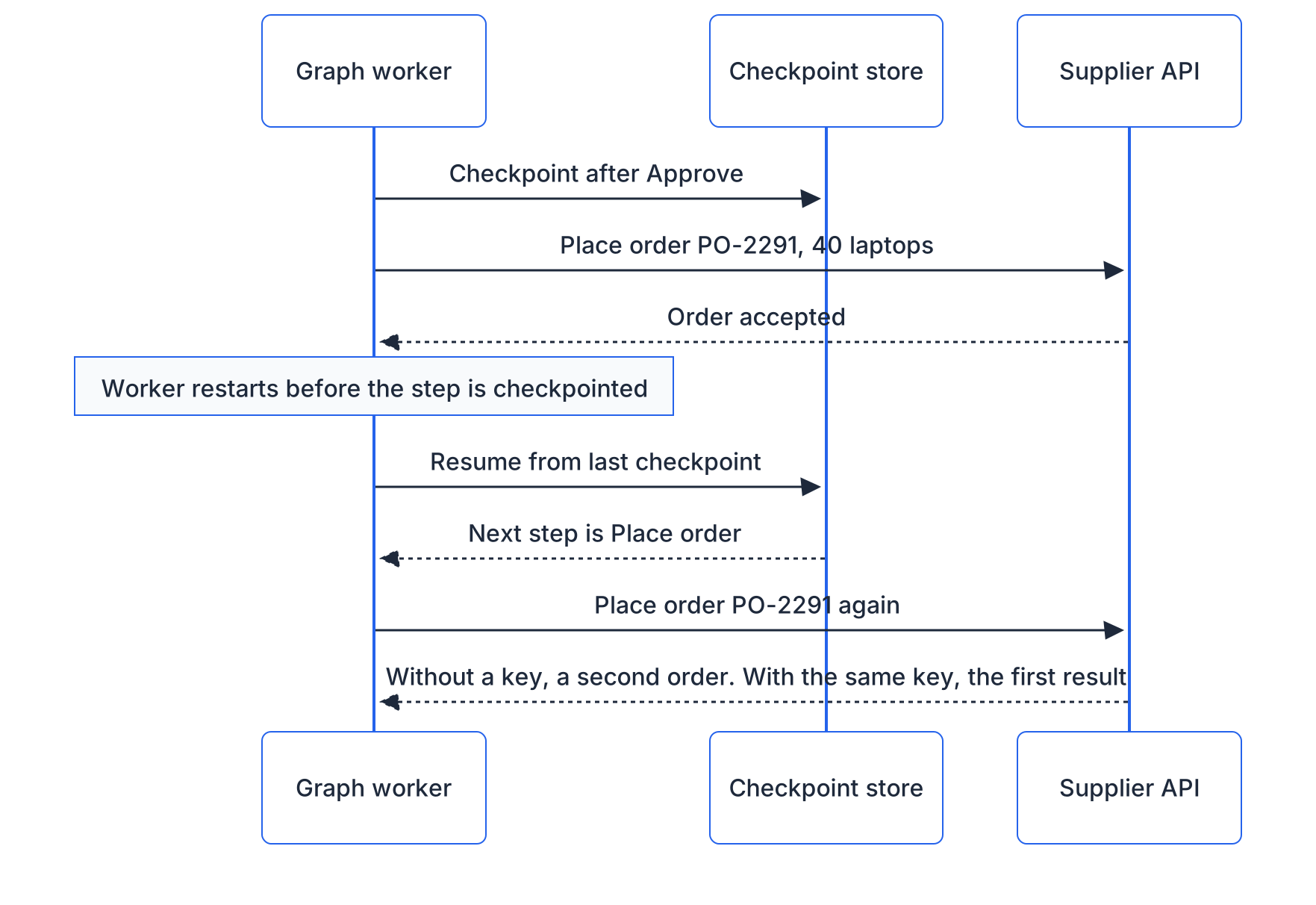
Read the durability documentation of LangGraph, Microsoft Agent Framework and ADK, and you find the same shape. LangGraph creates "a checkpoint at each super-step boundary", according to its checkpointer documentation. If a node fails, "you can restart your graph from the last successful step." Microsoft's Agent Framework checkpoint guide says checkpoints are created "at the end of each superstep, after all executors in that superstep have completed their execution." ADK's resume documentation says tools "are run at least once, and may run more than once when resuming". It advises guarding any tool where duplicates would cause harm, "such as purchases".
LangGraph also lets you choose when checkpoints are written, with a durability argument on each run:
"exit"saves only when the run exits, so "you cannot recover from system failures (like process crashes) mid-execution.""async"saves while the next step runs, with "a small risk" of losing a checkpoint in a crash."async"is the default in the installed LangGraph 1.2.18 source."sync"saves before the next step starts: "high durability at the cost of some performance overhead."
Even "sync" cannot help with the laptops. The supplier call and the checkpoint write happen in two systems. Unless the supplier takes part in the same transaction, no framework can commit both at once. A step that was running when the process died runs again. The fix is the one payment APIs already use. Stripe's idempotent requests documentation describes it: the client sends an idempotency key, and "if a connection error occurs, you can safely repeat the request without risk of creating a second object."
There is one trap. Stripe suggests random keys, such as version 4 universally unique identifiers (UUIDs). Generate that key inside the node that places the order, and a re-run generates a new one. That defeats the purpose. Create it in an earlier step and store it in graph state, so every re-run of the order step sends the same key.
# langgraph 1.2.18, langgraph-checkpoint-sqlite 3.1.2
import sqlite3
from typing import TypedDict
from langgraph.graph import StateGraph, START, END
from langgraph.checkpoint.sqlite import SqliteSaver

supplier = sqlite3.connect("supplier.db")  # stands in for the supplier's ordering API
supplier.execute("CREATE TABLE IF NOT EXISTS orders (idem_key TEXT PRIMARY KEY, po TEXT, qty INT)")

class Purchase(TypedDict):
    po: str
    qty: int
    order_key: str  # written by an earlier step, so a re-run reuses it

def place_order(state: Purchase):
    supplier.execute("INSERT OR IGNORE INTO orders VALUES (?, ?, ?)",
                     (state["order_key"], state["po"], state["qty"]))
    supplier.commit()
    return {}

builder = StateGraph(Purchase)
builder.add_node("place_order", place_order)
builder.add_edge(START, "place_order")
builder.add_edge("place_order", END)
graph = builder.compile(checkpointer=SqliteSaver(sqlite3.connect("graph.db", check_same_thread=False)))
The SQLite table plays the supplier: a primary key on the idempotency key makes a repeat a no-op, as a supplier honouring the key would. It is a deliberately simplified stand-in for a real ordering API. Kill the process right after the insert, resume the thread with graph.invoke(None, config), and LangGraph re-runs place_order, as its documentation says it will. The table still holds one order. Without the key, the same test leaves two orders and 80 laptops.
What if the supplier's API takes no idempotency key? Then you need a way to ask it whether this purchase-order number was already placed before you place it again. A flag in your own database cannot tell "placed" from "about to place" if the crash falls between the two.
Interrupts: a pause is a restart
Pausing for a person is where graphs beat hand-written loops, and where the second surprise waits. LangGraph's interrupts documentation is explicit: on resume, "the runtime restarts the entire node from the beginning—it does not resume from the exact line where interrupt was called." Any code before the interrupt() call runs again.
You can see it with a print statement. Put one at the top of an approval node, pause in one process and resume in another: the line prints in both. Harmless for a print, not for an email to the manager or a ticket in the service desk. The documentation's rules follow. Side effects before an interrupt should be idempotent. Better still, put them after the interrupt or in a separate node. And a while True loop around interrupt() replays every earlier iteration on each resume.
ADK made the opposite default choice. A function node that yields RequestInput does not re-run unless you set rerun_on_resume=True; the reply simply becomes its output. Neither choice is wrong, but code written for one breaks under the other. So the habit that works under both: the node that asks does nothing else, and the node that acts comes next. The same habit makes an approval a real control rather than a click. Our note on autonomy tiers covers approval design in depth.
The same graph on other stacks
| Stack | Graph API | Saved progress | Pause for a person |
|---|---|---|---|
| LangGraph | StateGraph, add_edge, add_conditional_edges | Checkpointer per super-step: InMemorySaver, SqliteSaver, PostgresSaver | interrupt(), resumed with Command(resume=...) |
| OpenAI Agents SDK | None among the documented primitives (agents, handoffs or agents as tools, guardrails); orchestration in code | RunState serialised and resumed | Tool calls marked as needing approval, per the human-in-the-loop guide |
| Google ADK 2.x | Workflow(edges=[...]), routes via Event(route=...) | Run state in the session store | Node yields RequestInput |
| Strands Agents (AWS, open source) | GraphBuilder: add_node, add_edge, cycles allowed | Session manager on the graph | Interrupted nodes tracked in graph state |
| Microsoft Agent Framework | WorkflowBuilder with executors and edges | Checkpoint storage per superstep; the Cosmos DB store installs as a pre-release package | RequestInfoExecutor, or ctx.request_info() in the functional API |
Two notes on the table. Anthropic's guidance has no graph API to compare; it frames the same choice as workflows versus agents, and suggests plain code first. And OpenAI's visual Agent Builder, a canvas of nodes and typed edges, is scheduled to shut down on 30 November 2026, according to its Agent Builder guide. Whichever stack you choose, keep the graph in code that you version and own.
Honest limits
- Cycles are not bounded for you. ADK's graph routes documentation says it plainly: "A graph cycle is not bounded automatically." LangGraph's Graph API documentation gives the default recursion limit as 10,007 super-steps from version 1.1.4, and a runaway single-node loop under the installed 1.2.18 ran all 10,007 before it stopped. With a model call in the loop, that is a bill. Set the limit explicitly on every run.
- Changing the graph can strand paused runs. Microsoft's documentation requires a rehydrated workflow to "preserve the topology and executor identities" of the one that saved the checkpoint, and ADK's resume guide says "Do not modify a stopped agent workflow before resuming it." Threads paused for a week will meet next week's deploy. Plan to drain them, or run old and new graph versions side by side.
- Checkpoints are sensitive data. They hold the conversation, tool results and often personal data. Microsoft calls checkpoint storage "a trust boundary" and warns: "Never load checkpoints from untrusted or potentially tampered sources." Apply retention and access rules as you would to a database of customer records.
- Replay is not free. LangGraph's time travel re-runs every node after the chosen checkpoint, "including any LLM calls, API requests, or interrupts." Debugging a graph by replay repeats its costs and, without keys, its side effects.
- A graph can harden around yesterday's model. LangChain notes that GPT Researcher swapped "its graph-shaped multi-agent pipeline" for an agent harness. Paths that a weaker model needed can become constraints a stronger one does not.
- A graph does not make any node correct. It makes the path explicit and the progress resumable. Whether the classifier labels correctly is still a question for evaluation.
Takeaways
- Graph engineering is a useful, still-emerging label for designing an agent's control flow as explicit nodes, edges and state, plus the checkpoints that let it pause and recover.
- Decide each edge on purpose: business rules in code, messy input labelled by a model and routed by code, open-ended work in a bounded agent loop inside one node.
- Frameworks save progress between steps. A side effect inside a step can repeat after a crash; idempotency keys stored in state make the repeat harmless.
- Know your framework's resume semantics. LangGraph re-runs the interrupted node; ADK function nodes do not by default. Keep asking and acting in separate nodes.
Reread-me checklist
- Can you point to the edge where the model chooses, and is every other edge plain code?
- Does every step that changes the outside world have its own node?
- Is its idempotency key created in an earlier step and stored in state?
- Does the external API honour that key, or can you ask it whether the action already happened?
- Is the node that asks a person free of side effects before the pause?
- Is the checkpointer durable, and is the durability mode a decision rather than a default?
- Is the recursion or step limit set explicitly on every run?
- Do you have a plan for runs that are paused when you deploy a changed graph?
- Is checkpoint storage access-controlled and covered by a retention rule?
What's next
A graph decides the order of steps. Inside a node, an agent still runs its own loop, and the harness around the model hosts that loop and decides what it can touch; harness engineering covers that layer. Around the graph, loop engineering decides what starts each run, what proves it done and what stops it.
Here is the one thing to do this week. Find the step in your graph that would do the most damage if it ran twice. Kill the worker straight after it, resume the run, and count what happened. If the count is not one and you would like a second pair of eyes on the fix, send it to us.
Further reading
- 3 Years of Graph Engineering with LangGraph, LangChain: Where the term came from, when a graph fits and when it does not, and an honest account of graphs that were later swapped for agent loops.
- Building effective agents, Anthropic: The workflows-versus-agents distinction this note builds on, with the advice to start from plain code.
- LangGraph checkpointers and durability modes, LangChain: The clearest statement of when progress is saved, what each durability mode risks, and what replay repeats.
- Idempotent requests, Stripe: A short, proven model for making a repeated call harmless, which is the fix for side effects inside a graph step.
- Agentic AI: pause and resume without paying twice, AELSHA™ NEHEMVIX: A pipeline that pauses for approval, survives quota limits and crashes, and resumes without re-billing finished work; How to document a LangGraph project shows where to find the graph, state, interrupts and checkpoints in the code.
Framework defaults and resume behaviour change between releases, so check the documentation for the version you run before you rely on them.